
Prerequisites
A prerequisite is a course or requirement you must complete before you can register for another course. Prerequisites help make sure you are prepared to succeed in a class.
Where to Find Prerequisite Information
You can find prerequisite information in the course description in the UT San Antonio catalog.
Example #1
CS 4373 – Data Mining (3 Credit Hours)
Prerequisites: CS 3343 and CS 3753
This means you must complete both CS 3343 and CS 3753 before you can take CS 4373.
Some courses allow concurrent enrollment, which means you can take a prerequisite course during the same semester as the course you want.
Example #2
KIN 3313 – Anatomy and Physiology for Kinesiology
Prerequisite: KIN 2303; and completion of or concurrent enrollment in KIN 3311
In this example, you must have already passed KIN 2303. You may take KIN 3311 at the same time as KIN 3313, or you may have already completed it.
Prerequisite Audit
Before each term begins, UT San Antonio runs a prerequisite audit. This audit checks whether students meet the prerequisites for the courses they are registered in. If you are registered for a course and do not meet a prerequisite:
- You will receive an email to your UTSA email account.
- The email will list the course(s) that may be dropped.
- The email will include the date the course will be dropped if no action is taken.
Students should review their schedule and make any needed changes in myUTSA before the drop date.
Common Prerequisite Issues
When students attempt to register for a course and they have not met the prerequisite, the system will show an error that says “PREREQ AND TEST SCORE ERROR” and then say which prerequisite is still needed. Students would then need to select a different course to register for. On occasion there may be an error. See below for common prerequisite issues.
- Check Degree Works to confirm the prerequisite course is listed as completed.
- Make sure you are not registered again for a course you have already passed. If you are, drop the repeated course.
- If the issue continues and all requirements are met, contact One Stop or your academic advisor for help.
- Request that the other school send an official transcript to UT San Antonio.
- Check Degree Works to see if the transfer course appears. The course must transfer as the UT San Antonio equivalent. An exception in Degree Works alone is not enough to allow registration. If the transfer course is showing in Degree Works and you are still getting a prerequisite error, contact your academic advisor.
- If the course does not appear, the transcript may still be under review. During busy times, transcript evaluations can take up to four weeks.
In some cases, an academic advisor may allow you to stay registered temporarily if you provide proof that you passed the prerequisite before the drop date.
Important: Taking a prerequisite at another school close to the start of the term can be risky. If the transcript is not received and processed in time, your course may be dropped.
Prerequisites are set by academic departments to help students succeed. In most cases, you must complete the prerequisite before registering.
In rare situations, a student may have gained the required knowledge through work experience or other learning. In these cases, the student may request a prerequisite override.
- Override requests are reviewed by the course instructor and/or the Department Chair.
- Academic advisors and the Registrar’s Office cannot approve these requests.
Instructions for submitting a prerequisite override request are provided below.
Prerequisite Override
In certain circumstances, students may request permission from academic advisors, department chairs, associate deans, and/or instructors to register for a course without having the specified prerequisite completed or in progress. For students to request an override, they must submit a Prerequisite Override Request Form.
How to Submit a Prerequisite Override Request Form
- Go to the Prerequisite Override Request Form
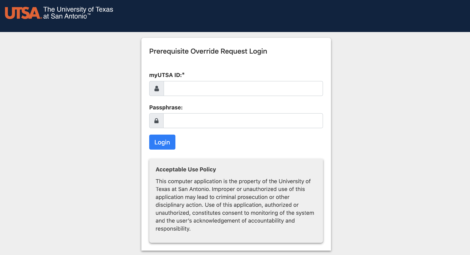
- Login with your myUTSA ID and passphrase
- Your information will be pre-filled. Complete the other fields including the CRN for the course you are seeking a prerequisite override and the reason for the request.
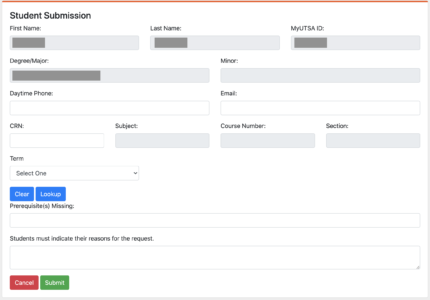
- Once you hit submit, your request will be automatically routed to your instructor/department. You will receive an email if your request was approved or disapproved.