
Drops & Withdrawals
We know things can change once you register for classes. Here is what you need to know in order to drop an individual course or withdraw from the semester.
Dropping an Individual Course
Dropping an individual course means you are still enrolled for one or more classes at UT San Antonio for the semester. If you do it on or before the census date for the term you are registered, then it will not show up on your transcript but it may impact enrollment requirements for financial aid. If it’s dropped after the census date for the term, you will receive an automatic “W” for the course on your transcript. There is a deadline to drop courses for each term which is notated on the academic calendar.
Note: There is a six-drop policy for undergraduate students. Review the Student Policies to learn more about it.
How to Drop a Course
You can drop individual classes from your schedule on myUTSA Account. Note: if you are trying to drop a development course, you will need to contact your Academic Advisor.
- Login to your myUTSA Account
- Select the “App>Registration” link from either the Quick Launch card or the Menu: Registration & Records card
- Select “Register for Classes”
- Select the term
- In the Summary block, click on the dropdown under the Action column for the course you need to drop. If you are dropping the course before Census Date, select the option for Drop Course-No Grade Web. If you are dropping the course after Census Date, select the option for Drop Course-Auto W Web.
- Click on the Submit button to process the drop.
- After you hit “Submit” you’ll see a “Save Successful” message in green at the top right of the page.
Withdrawing from the Semester
Withdrawing means you will no longer be enrolled in any classes for the semester. If you withdraw by the census date for the term, you will not receive a grade on your transcript. After the census date, you will receive a grade of “W” in all classes which will appear on your transcript.
How to Withdraw
You must complete and submit the Withdrawal Form.
If you need to pursue a Medical Withdraw, please review additional information about this process.
Withdrawal Workflow – Student Perspective
1. Student will access Withdrawal Form by visiting https://onestop.utsa.edu/withdrawal
2. Student will need to click on the ‘Log in with SAML’ button and sign in using their abc123 and passphrase:

3. Step 1- Student Information: The Withdrawal Workflow process should automatically pre-fill student’s information (i.e. myUTSA ID and Name)

4. Step 2- Term of Withdrawal: Student will select the term they would like to be withdrawn from courses from the drop-down menu and check the specific term they wish to be withdrawn from.
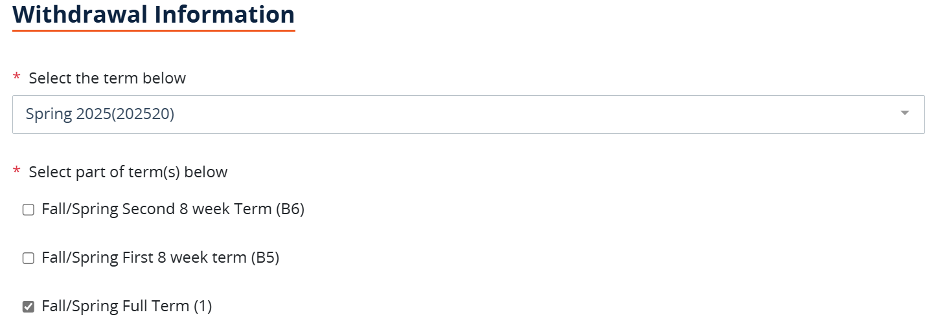
5. Step 3- Reason for Withdrawal: Student will select the reason for their withdrawal

6. Student Certification and Signature: Student will sign the form and submit using their myUTSA ID

7. Form will be routed to the appropriate department for approval:
- Regular Students: Form will be routed to Registrar and should be processed within be processed within 3-5 business days
- International Students: Form will be routed to International Programs for approval. Once approved, form will then be routed to Registrar for processing.
- Student Athletes: Form will be routed to Athletic Advisor for approval. Once approved, form will then be routed to Registrar for processing.
8. Students will receive an email notification letting them know if their withdrawal request has been processed or denied. If withdrawn, students will be able to use their email notification to cancel their housing contract (if living on campus).
Need to Withdraw from an Upcoming Term?
If you need to withdraw from a term that has not yet started, you can complete this process through your myUTSA Account by following the regular procedures for dropping courses. Simply log in to your account and drop all courses for the upcoming term.
Other Important Information
Tuition and Fee Refunds
In order to receive a 100% tuition and fee refund for your courses, you must withdraw before the first day of classes. On the first day of class and after, you will be subject to a declining refund. You can view these dates in the academic calendar.
If it’s after the start of the semester, but it’s due to medical and/or mental health or for military service, please refer to the Student Policies for additional information.
Financial Aid Impacts
Withdrawing from the university may impact financial aid that has been paid to your UT San Antonio bill. Learn more about returning financial aid.
Readmission Policies
If it’s your first time attending UT San Antonio as an undergraduate student, you must attend the semester you are admitted. If you decide to withdraw, you will need to reapply for admission to UT San Antonio. If you are a graduate student, speak to your Graduate Advisor about deferring your start term.