
Apply For Graduation
All students must apply for graduation. It is recommended that undergraduates apply for graduation once their Requirements and Credits under Degree Progress has reached 80% in Degree Works; graduate students after completing 24 semester credit hours.
How Do I Know if I Can Graduate?
While we encourage students to apply for graduation when they reach a certain point in their degree (80% of degree progress met for undergraduates and completing 24 semester credit hours for graduates), it’s important to review DegreeWorks, check in with your Academic Advisor, or reach out to Success Support with questions or concerns. These resources are available to help you determine if you’re eligible to graduate!
How Do I Apply for Graduation?
Below are instructions on how you can apply for graduation as an Undergraduate, Master’s, and Doctoral student through your myUTSA Account. Applications must be submitted by the deadline. Certificate students can find instructions here. Note: Students with holds will not be able to submit an electronic application and must submit a Graduation Application Form.
- Log into your myUTSA Account.
- Click on the Main Menu (top left) and select “Student Services,”
- Under the Menu: Graduation & Commencement card, click on the “App Graduation Application” button.
- Under Term select the current term from the drop down menu.

- You will see your major and curriculum information display. Select the program and click “continue.” Note: This term displayed is not associated with the graduation term you are applying for. If you see more than one curriculum listed (double major or certificate), you will need to complete these steps for both.
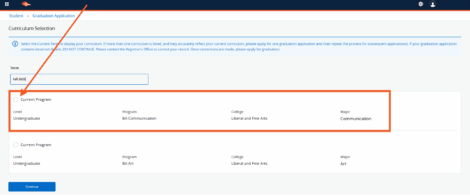
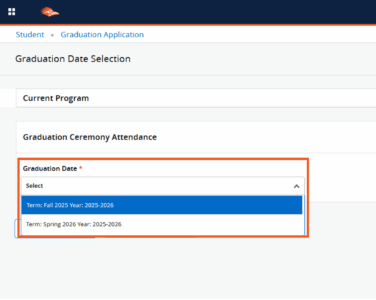
- Under Graduation Date, you will select your graduation term from the drop-down menu.
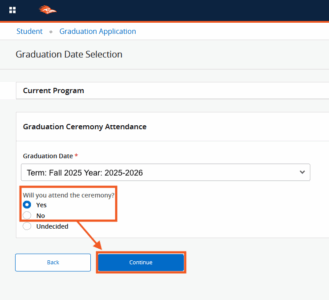
- Once selected, another field will populate so you can answer “Yes” or “No” if you want to attend the Commencement Ceremony. Please do not select “Undecided” from the drop-down menu.
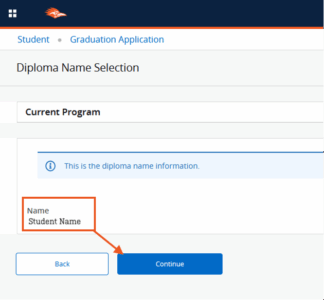
- Your Diploma Name will appear and defaults to your name in the system. If your name is incorrect, please submit a Biographical Data Change Request Form with supporting documentation. Please continue with your application regardless of whether your name is correct.
- From the drop-down menu, select your Mailing Address for your diploma, or if you need to add a Mailing Address, please select “New.” Note: Only active addresses in the system will display.
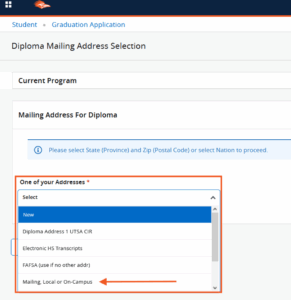
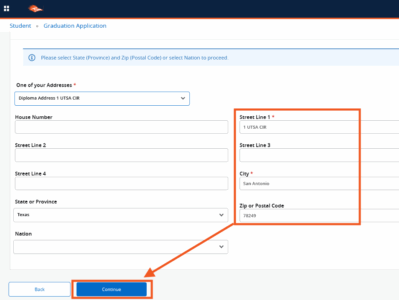
If you select an existing address, your information will autofill, and you can edit as needed. Once reviewed, click “Continue.”
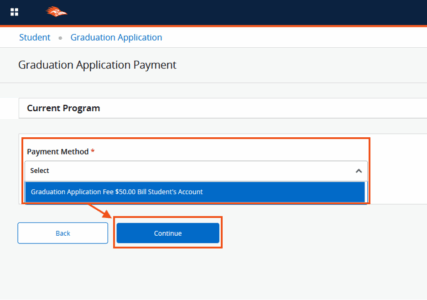
- In the Payment Method section, select Bill Student’s Account from the drop-down menu. This fee will be added to your Rowdy Pay after you submit your application.
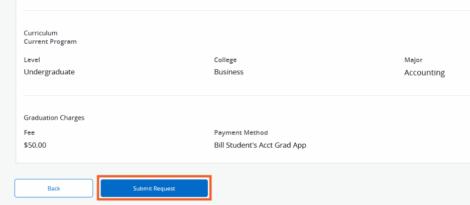
- Review your application summary. If everything is correct, click on “Submit Request.”
- After you submit, you will receive an Acknowledgment message.

Students with double majors, double minors or double concentrations:
If you have two majors, two minors or two concentrations, you will need to submit a graduation application for both.
Application Fees
Below are the fees charged for the Graduation Application. These fees will automatically apply to your student bill on Rowdy Pay once you apply. A fee will be charged each time an application is submitted. If you are double majoring in the same degree, only one fee will be assessed.
| Undergraduate Programs | $50 |
| Graduate Programs | $50 |
| Doctoral Programs | $50 |
| Certificates | $25 |
| Late Applications | $75 |
Application Deadlines
The Application for Graduation for Undergraduate, Master’s, Doctoral and Certificate students must be submitted by the semester deadlines listed below. Applying for graduation by the priority application deadline increases the likelihood that a student’s record will be reviewed to identify any missing requirements before the term begins. Students should contact their assigned academic advisor prior to their final semester to ensure they are on track to complete requirements for graduation.
| Fall Graduation — Deadline to Apply | |
|---|---|
| Fall Priority | July 15 |
| Fall Final | September 15 |
| Spring Graduation — Deadline to Apply | |
| Spring Priority | November 15 |
| Spring Final | February 15 |
| Summer* Graduation — Deadline to Apply | |
| Summer Final | June 15 |
| Doctoral candidates may only participate in December | |
*Degrees awarded in summer will state a graduation date of August, regardless of the date of participation in commencement. Undergraduate and master’s students graduating in the summer have the choice of participating in either the May or December commencement ceremony as there is no ceremony in the summer. Doctoral students graduating in the summer can participate in the December commencement ceremony, as the dissertation defense must be completed prior to commencement.
After the final graduation deadline, the student’s name may not be in the Commencement Program. Additionally, any changes to the diploma name must be made before these deadlines.
Missed Deadline Procedure
Students who miss the application for graduation deadline must petition for graduation. It is not guaranteed that a student’s petition will be approved.
- Undergraduate students: Contact the Office of the Registrar.
- Graduate students: Contact the Office of the Associate Dean for Graduate Studies of the college in which you are enrolled.
- The student’s name may not appear in the Commencement program if the graduation application deadline is missed, regardless of petition approval.
| Deadline to Petition for Graduation Late petitions will not be accepted after these dates. |
|
|---|---|
| Fall | October 1 |
| Spring | March 1 |
| Summer | July 1 |
Certificate Procedure
Below are instructions on how you can apply for a certificate. Applications must be submitted by the deadline.
- Log into your myUTSA Account.
- Click on the Main Menu (top left) and select “Student Services,”
- Under the Menu: Graduation & Commencement card, click on the “App Graduation Application” button.
- Under Term select the current term from the drop down menu.
- You will see your certificate and curriculum information display. Select the program and click “continue.” Note: This term displayed is not associated with the graduation term you are applying for.
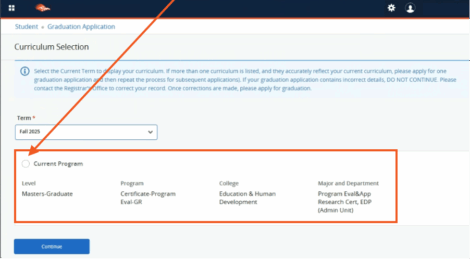
- Under Graduation Date, you will select your graduation term from the drop-down menu. Note: Certificate Applicants are not eligible to attend the Commencement Ceremony.
- Your Diploma Name will appear and defaults to your name in the system. If your name is incorrect, please submit a Name and ID Change Form with supporting documentation. Please continue with your application regardless of whether your name is correct. Note: You will not receive a diploma or hard copy for your certificate program.
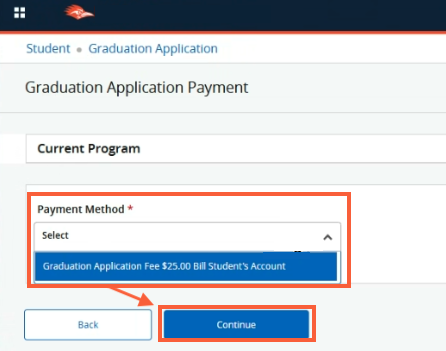
- In the Payment Method section, select Bill Student’s Account from the drop-down menu. This fee will be added to your Rowdy Pay after you submit your application.
- Review your application summary. If everything is correct, click on “Submit Request.”
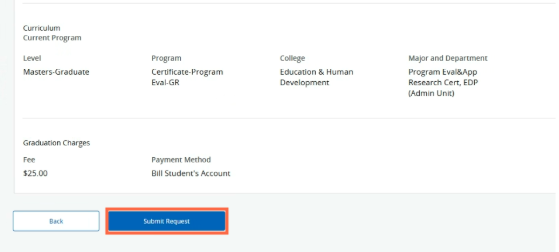
- After you submit, you will receive an Acknowledgment message.
If you missed the final deadline to submit your certificate application online, you will need to submit an Application for Certificate by the petition for graduation deadline.
Awarding of Your Degree
All Students
Once all final audits are completed – approximately 30 days after the end of the term – degrees will be posted to the transcripts. Degrees awarded in summer will state a graduation date of August, regardless of the date of participation in commencement.
Undergraduate Students
To ensure that requirements for the degree are met, the college undergraduate advising center in which the student is enrolled is responsible for the degree audit. A final audit is conducted at the close of the semester. Contact the advising center for questions concerning the audit process.
Graduate Students
Degree audits are conducted by the college in which the student is enrolled. The documents needed to complete the degree are compiled and verified by the college Associate Dean’s office. The documents are forwarded to Graduation Coordination in the Registrar’s office for recording.
Degrees awarded in summer will state a graduation date of August, regardless of the date of participation in commencement.
What happens if I apply for graduation, but do not actually graduate?
Students who apply for the degree in a given semester but do not fulfill all requirements must submit a new application for graduation before the deadline for the semester in which they intend to graduate.
Withdrawing a Graduation Application
If you wish to withdraw your graduation application, please submit the Request to Withdraw Graduation Application form through the Document Uploader.
Note: You will need to reapply for the term you wish to graduate through your myUTSA Account.